
Best Construction Project Management Software: Integrated Suite vs. Disconnected Tools
Schedules slip, budgets balloon, reputations suffer. McKinsey research shows large construction projects still finish about 20 percent late and can cost up to 80 percent more than the original estimate.
The culprit is a mountain of disconnected spreadsheets, email chains, and one-off apps. FMI’s “Construction Disconnected” report found professionals lose 14 hours every week—35 percent of their time—just hunting for information or fixing preventable mistakes.
Owners are pushing back. More than half of U.S. project owners now insist on a single connected platform that moves data cleanly from design through turnover. That demand reshapes the software field and leaves you with two paths:
- Adopt an all-in-one suite that offers one login and one source of truth.
- Stitch together best-of-breed point tools and trust the APIs to keep everything talking.
We spent the last quarter reading analyst briefs, skimming Reddit threads, and testing trial accounts to surface ten platforms that help teams deliver work on time and on budget.
Here’s what you’ll get in the next few minutes:
- An evidence-based scoring system behind our rankings.
- Insight into 2026 tech trends—AI scheduling, digital twins, and more—and how they shape your buying decision.
- Narrative reviews of each top solution, written for GCs, specialty contractors, and owners.
Let’s dig in and find the tool—or combination of tools—that finally connects your field crews, office staff, and partners without the costly gaps holding projects back today.
Why connected construction software is crucial
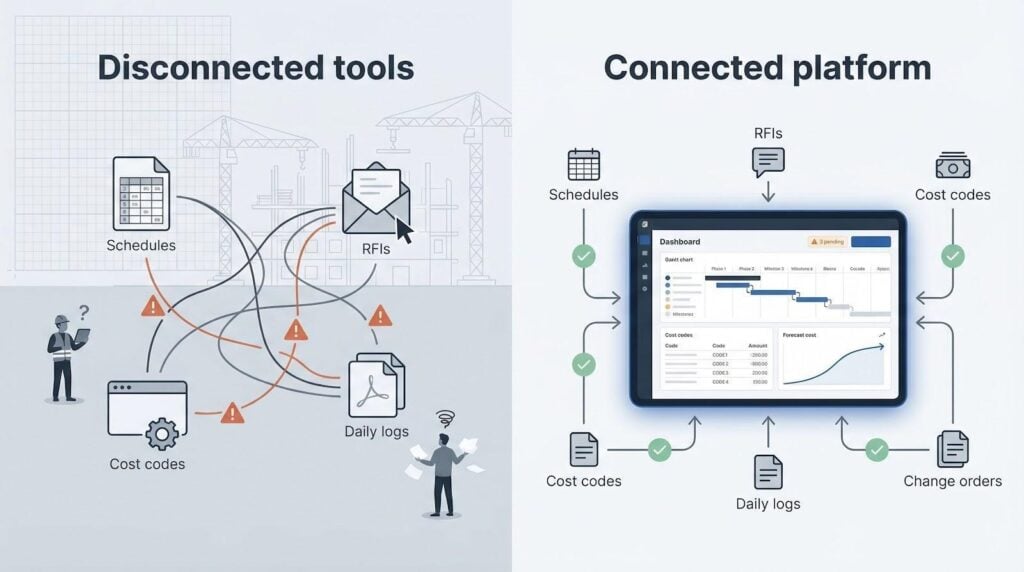
Let’s zoom in on the root problem crews face on site and in the trailer: information chaos.
When schedules, RFIs, and cost codes sit in half a dozen apps plus spreadsheets, data slips through the cracks. The FMI study cited earlier puts a hard number on the waste: 14 hours each week are lost to file hunts or fixing avoidable mistakes. That is a full workday gone before the crew even pours concrete.
The gaps grow expensive fast. Large projects already run 20 percent longer and up to 80 percent over budget, according to McKinsey’s global review. Every missing drawing revision chips away at margin and erodes client trust.
Owners recognize the problem. In 2022, more than half adopted a single connected platform to keep design, field, and finance moving in lockstep. When the client demands real-time transparency, a patchwork stack is no longer defensible.
Integrated software changes the story. One schedule update alerts subs, syncs mobile punch-list deadlines, and realigns forecast cost curves in minutes. The field never wonders which drawing is current; the platform displays the latest set by default. Accounting pulls approved change orders straight from the same record the superintendent closes on her tablet.
InEight’s Control module ties those field quantities directly to cost codes and its earned-value engine.
Product documentation notes that this real-time visibility has helped contractors catch overruns early enough to save up to 10 percent in software and technology spend, turning routine data syncs into bottom-line protection.
That flow saves dollars and goodwill. Questions stay inside the tool, so blame games fade. Younger project managers, digital natives, embrace the shift, while seasoned supers find they can file a daily log from their phone before leaving the jobsite.
Are point tools still useful? Absolutely. A focused app like Bluebeam or Fieldwire shines at specific tasks. The catch is integration friction. If an estimate never moves cleanly into the project budget, you re-type numbers and invite risk.
So the real choice is not “suite or nothing.” It is deciding how many links in your data chain you can tolerate before the weakest one snaps. In the next sections, we’ll explain exactly how we scored the leading platforms on breadth, ease of use, integration strength, and value, so you can pick the setup that keeps every stakeholder reading from the same playbook.
How we evaluated the platforms
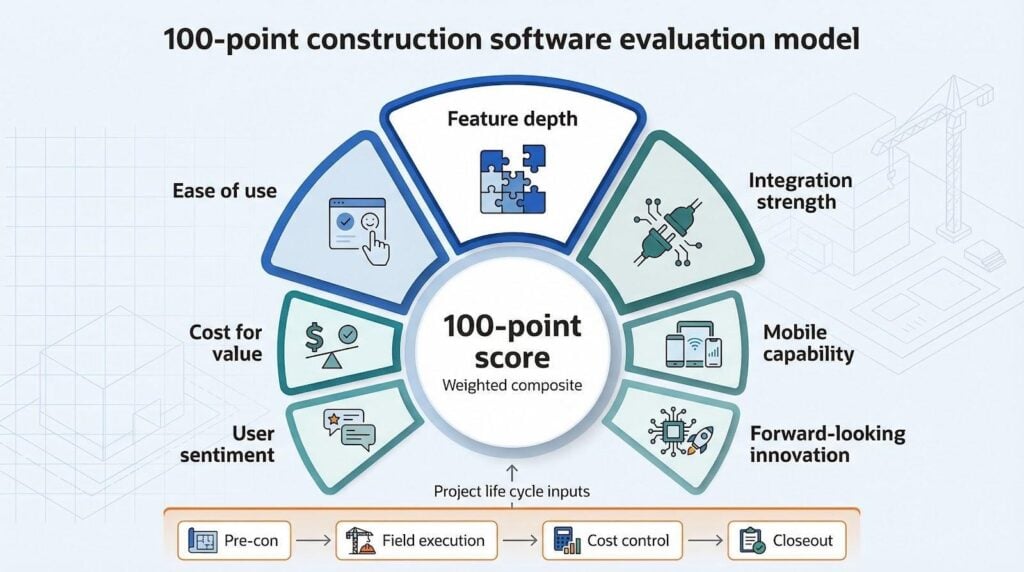
You deserve a ranking based on evidence, not gut feel or affiliate payouts, so we built a scoring model and followed it.
First, we mapped the entire project life cycle (pre-con, field execution, cost control, closeout) and listed the software capabilities that truly move the needle at each stage. From there, every candidate earned points across seven buckets.
Feature depth carried the most weight. A platform had to manage drawings, RFIs, schedule changes, cost events, and mobile field input without forcing work-arounds. If a tool excelled in one area but ignored the rest, its score reflected the gap.
Ease of use came next. We watched foremen and project engineers explore trial accounts, timing how long it took them to create a daily log or upload a revised plan. Confusing menus shaved points, while smooth onboarding added them.
Integration strength mattered just as much. We rewarded open APIs, out-of-the-box QuickBooks or Sage links, and marketplaces with proven add-ons. Closed gardens lost ground because duplicate data entry drains profit.
Cost for value stood in its own column. We compared sticker prices, hidden training fees, and break-even stories in customer case studies. A high price tag is acceptable when time savings or risk reductions are clear and documented.
User sentiment was not hearsay. We scraped the latest Capterra and G2 reviews, tossed out noise, and focused on consistent praise or pain. Those scores rolled into our model after normalization.
Mobile capability and forward-looking innovation rounded out the list. A platform without reliable offline sync or a plan for AI scheduling cannot call itself future ready.
The result is a weighted composite on a 100-point scale with transparent notes for every deduction or bonus. That score sets the order you will see in the next section, with no vendor influence, no editorial shortcuts, and proof you can audit.
2026 tech trends shaping your shortlist
Cloud is no longer a novelty in construction tech; it is the default. Every platform on our list runs in the browser, syncs on mobile, and stores drawings in the cloud so the field never waits for a VPN. If a vendor still touts “installers,” treat that as a warning sign.
Mobile has matured, too. Tablets are standard issue, and the best apps record punch-list items offline, then sync as soon as LTE returns. That offline reliability keeps daily logs moving even when the jobsite blocks a signal.
Integration is the new battleground. Open APIs and app marketplaces now outpace feature checklists. Procore offers hundreds of plug-ins, and focused tools like Fieldwire score points by piping punch data straight into those hubs. Closed ecosystems lose ground because contractors refuse to re-enter cost codes.
Artificial intelligence is practical, not hype. Add-ons flag schedule slippage based on crew productivity or classify site photos for safety risks. Smart teams treat AI cues as a second set of eyes, and the time savings grow each quarter.
Owners now push for richer analytics and ESG tracking. Dashboards that surface carbon metrics or diversity spend already influence bid decisions. Choosing a platform that captures source data cleanly today will spare you retrofitting pain when reporting rules tighten.
Keep these trends in mind as we move into the rankings. The best software solves today’s problems and leaves room for tomorrow’s demands without forcing a costly migration.
1. InEight: integrated project controls suite
If you build highways, data centers, or billion-dollar energy plants, you already know spreadsheets buckle under that weight. InEight Software replaces those disconnected files with one platform that unifies scope, cost, and schedule, so the same data drives estimating, planning, and field progress.

InEight integrated project controls suite UI screenshot
The platform was born inside a heavy-civil contractor, so the workflows feel natural to big capital projects. Estimators push quantities and productivity rates straight into the baseline budget. Planners open the same data in the scheduling module, apply risk ranges, and publish a CPM the field can live with. Once work starts, daily quantities captured on tablets hit the earned-value engine automatically. No re-keying, no lag.
Executives watch live performance curves instead of last month’s PDF. When design changes land, the variation ripples through forecast cost and schedule in minutes, giving you a realistic finish date before the concrete truck leaves the batch plant.
Implementation is structured yet flexible. Most owners start with Cost Management or Scheduling, then add Field Progress once the team has muscle memory. Expect a few weeks of guided configuration, not a lost season, and support staff who speak construction, not generic SaaS.
Pricing is quote-based because project scale varies wildly. It is not cheap, but for programs measured in hundreds of millions, avoiding one overrun repays the subscription many times over.
Bottom line: choose InEight when financial exposure is too high for guesswork and you need one system to control the full project life cycle with audit-ready precision.
2. Procore: universal construction platform
Procore has become the day-to-day command center for mid-size and large general contractors. Walk any major jobsite and you will hear “check Procore” whenever a drawing or RFI comes up.

Procore universal construction platform dashboard screenshot
The appeal is breadth. One login covers drawings, RFIs, submittals, daily logs, safety forms, budgets, commitments, and owner dashboards. The mobile app mirrors the web layout, so field teams pull the same data the office sees without digging through nested menus.
Setup feels lighter than legacy enterprise tools. You spin up new projects from templates, invite subcontractors at no extra cost, and push your Primavera or MS Project schedule into the platform in a few clicks. Procore’s marketplace then fills remaining gaps, linking QuickBooks, Sage, drone imagery, and reality-capture workflows.
Cost is the hurdle. Pricing aligns with annual construction volume, so small contractors may feel sticker shock. Yet firms that process millions through the system report fewer change-order disputes and faster pay-application cycles, benefits that often offset the license.
Feature maturity varies. Financials, quality, and safety modules advance quickly; native scheduling reached parity with stand-alone tools this year. If you need critical-path power, you still sync Primavera P6. For teams seeking one system of record and near real-time collaboration with owners, Procore remains the most widely adopted option on the market.
3. Autodesk Build: BIM-centric field & project management
If your projects start in Revit and flow through Navisworks clash detection, Autodesk Build keeps the digital thread intact from design through punch list closeout.
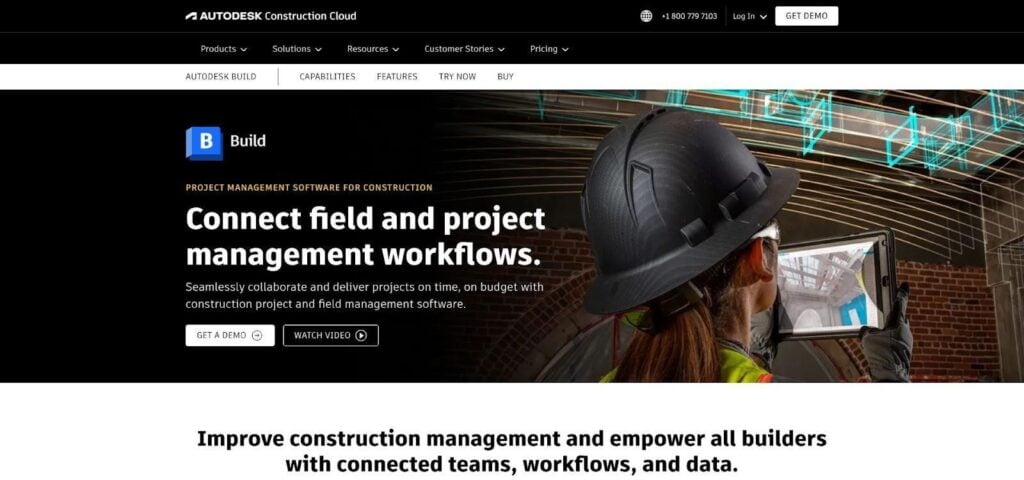
Autodesk Build BIM-connected field management interface screenshot
Build anchors Autodesk Construction Cloud, pulling drawings, 3D models, quantities, and issues into one workspace. Designers publish sheet sets once, and the field views them on iPads with automatic version control. RFIs link to model locations, so a plumber sees exactly which elbow conflicts with the steel.
The 3D connection is the standout benefit. Crews spin models on site, isolate systems, and pin clashes before they become rework. Owners appreciate the transparency because every change request carries visual proof, not just a PDF markup.
Cost management arrived last year and is gaining ground. You can track budgets, change orders, and payment applications without exporting to Excel, though deep forecasting still trails Procore’s financial module.
Licensing follows a bundle model. Many firms already pay for design seats, so adding Build feels incremental, but stacking modules such as BIM Collaborate Pro, Takeoff, and Docs increases cost. Training takes planning; the interface spans multiple apps, and field staff need clear workflows to avoid tab confusion.
Choose Autodesk Build when model coordination drives your schedule and you want design and construction data in the same cloud. It excels on hospitals, labs, and other projects where a missed clash costs six figures, while still giving supers the fast tools they need for daily reports and photo logs.
4. Buildertrend: residential builder’s all-in-one command center
Custom home builders juggle an extra stakeholder: the homeowner who wants updates around the clock. Buildertrend solves that visibility problem without drowning a small team in enterprise complexity.
Everything starts with the client portal. Schedules, photos, change orders, and payment requests appear there automatically, so owners scroll a timeline instead of calling for status.
Behind the curtain, the platform covers core production tasks: Gantt scheduling, selections, purchase orders, and budget tracking. It also reaches into pre-construction with lead management and proposal generation, then carries projects through warranty work. Few tools span that cradle-to-warranty arc in a package sized for companies building ten to fifty homes a year.
Pricing is flat and user-agnostic, which matters when you invite subcontractors. You pay by plan tier, not by headcount, so adding the plumber costs nothing extra. The trade-off is depth. Gantt views are adequate but will not replace Primavera for critical-path analysis, and reports answer everyday questions but stop short of complex forecasting.
Implementation lands in days, not months. Most teams import a template schedule, load contacts, and run their first job inside a week. Buildertrend’s onboarding coaches guide live sessions, and the knowledge base is written in plain English, not IT jargon.
For residential contractors who thrive on homeowner satisfaction and word-of-mouth, Buildertrend hits the sweet spot: extensive enough to keep projects on track, yet friendly enough that a project coordinator masters it over coffee.
5. Trimble e-Builder: owner-focused capital program control
General contractors love Procore, but public agencies and large institutional owners often mandate e-Builder for one reason: it flips the lens from construction execution to capital stewardship.
Budgets, funding sources, and cash-flow curves sit at the center of the dashboard. Every RFI, submittal, and change order runs through approval gates that match the owner’s procurement rules. By the time a pay application reaches accounts payable, the system has checked scope, budget line, and signature hierarchy.
That rigor saves headaches during audits. Reviewers pull a single report and trace any cost from board approval to final invoice, complete with comment history and attached documents. Contractors may see extra clicks, yet owners gain confidence that no field memo turns into an unauthorized spend.
The user interface trails newer rivals, so onboarding patience matters. Trimble balances this with hands-on implementation help and FedRAMP-authorized hosting, essential for government work.
Pricing reflects enterprise depth: multi-year, multi-project subscriptions often reach six figures. Smaller private developers may balk, but for hospital systems, universities, or departments of transportation managing billions in parallel projects, e-Builder’s governance and audit trail justify the investment.
Use e-Builder when you hold the purse strings and need process control more than field-level speed. It is the paperwork backbone that keeps large capital programs on time, on budget, and out of headlines.
6. RedTeam Go: value-packed suite for small general contractors
Margins are tight for contractors chasing projects under ten million dollars. RedTeam Go protects those margins by bundling bids, budgets, schedules, and field logs into one flat-fee subscription that never counts users.
Bid invitations leave the platform, subcontractors submit quotes in the same portal, and accepted numbers seed the job budget automatically. As daily reports and purchase orders hit the job, cost-to-complete dashboards update in real time, so you spot overages long before pay-application day.
The interface feels built for builders, not accountants. Superintendents open the mobile app, enter quantities, snap photos, and move on. Office staff value the built-in pay-application generator that prints AIA-style forms without wrestling with spreadsheets.
Reporting is lighter than enterprise giants, and integration options focus on essentials such as QuickBooks Online rather than a vast marketplace. For small firms without IT staff, that simplicity is a benefit. You spend Friday reviewing profit curves, not troubleshooting API keys.
Onboarding is guided by live coaches, and most teams launch a first project within a week. At roughly five hundred dollars a month for unlimited users and projects, RedTeam Go often costs less than the rework it prevents on a single change order.
If your crew size fits in one group text and you want enterprise-style visibility without enterprise overhead, RedTeam Go is a practical choice.
7. Contractor Foreman: budget-friendly multi-tool for tiny teams
Start-up contractors often piece projects together with Excel, Dropbox, and a whiteboard because “real” software looks expensive. Contractor Foreman flips that math by packing estimating, scheduling, daily logs, timecards, safety forms, and even a simple website builder into plans that cost less than a cell-phone bill.
The breadth impresses. Build a bid, convert it to a project budget, assign tasks on a Gantt chart, and invoice the client without leaving the browser. QuickBooks sync keeps accounting in step, avoiding the double entry that steals evenings.
The trade-off is polish. Menus feel crowded, and the interface favors function over style. New users should spend an hour deciding which of the thirty-plus modules they will use; hiding the rest streamlines the experience.
Depth is thinner than big-ticket rivals. The Gantt tool tracks dependencies but skips critical-path metrics, and reports cover basics rather than predictive analytics. For a five-person remodel crew, those gaps rarely matter.
Implementation is self-serve. Sign up, import a client list, and you are live. Support responds quickly on chat and offers weekly webinars, a helpful perk at this price point.
Plans start around fifty dollars a month and top out near one-fifty for the entire company, with a ninety-day money-back guarantee. If your revenue cannot yet justify Procore or Buildertrend, Contractor Foreman delivers a capable on-ramp to structured project management without draining cash flow.
8. Sage 300 CRE: gold-standard job costing with project-management add-ons
Ask any construction CFO which system they trust for certified payroll, retainage, and work-in-progress reporting, and Sage 300 tops the list. It is an accounting powerhouse first, with project management bolted on, but that finance core still solves headaches no cloud newcomer matches.
Every dollar flows through construction-specific ledgers: cost codes, commitment tracking, AIA billing, and lien waivers. When a project manager enters a change order, the budget and general ledger sync instantly, eliminating the month-end scramble to reconcile spreadsheets with the books.
The project-management module handles RFIs, submittals, meeting minutes, and basic scheduling, yet the interface looks dated. Field crews rarely log in directly; they feed timecards or daily reports through a mobile companion or an integration such as Procore Sync. This hybrid keeps accountants happy while letting supers work in tools built for phones.
Deployment can be on-prem or via authorized cloud hosts. Either way, you need an implementation partner to map the chart of accounts and import historical jobs. Once live, finance gains real-time visibility, and the bonding company finally receives the granular cost data it requires.
Licenses are sold per seat, so costs climb as headcount grows, but many midsize contractors already own Sage for accounting. For them, turning on the project-management module is a logical step before considering an all-new platform.
Choose Sage 300 CRE when airtight financial control outweighs sleek design, and you can surround it with modern field and collaboration apps through well-worn integrations.
9. Fieldwire: fast field coordination app
When a superintendent needs to pin an issue to a plan before the concrete sets, speed beats feature bloat. Fieldwire keeps the workflow tight: open the plan, drop a pin, snap a photo, assign a due date. Task complete in under thirty seconds, even offline.
Fieldwire fast field coordination plan view screenshot
Plans automatically link detail callouts, so crews jump from Level 1 to Section A/A1 without hunting filenames. Offline mode caches sheets on the device, essential in basements where LTE disappears. Once service returns, everything syncs to the cloud and alerts responsible parties.
The platform excels at punch lists and inspections. Create templated checklists for safety, quality, or commissioning, then run them room by room. PDF reports export with one tap, satisfying owners who expect daily proof of progress.
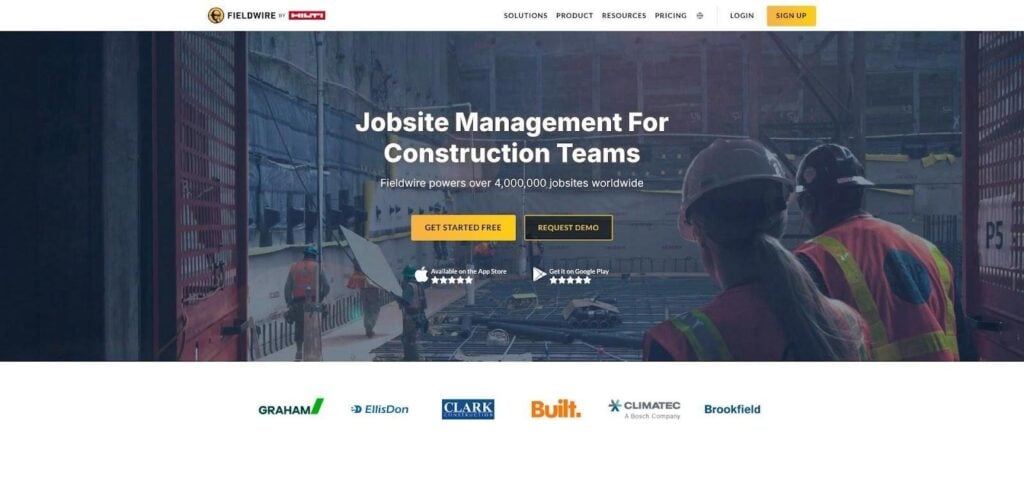
Fieldwire stays lean by design. It skips budgeting, advanced scheduling, and payment workflows. Most general contractors pair it with a suite such as Procore or with Sage for cost control. Out-of-the-box integrations handle those transfers, so punch items move into the larger system instead of sitting in isolation.
Pricing begins with a free tier for up to five users and three projects, then shifts to per-user plans around fifty dollars monthly. That flexibility lets subcontractors test it on a single job without a long contract, making adoption friction-free.
Think of Fieldwire as the digital notepad every foreman can master in minutes. It will not run your whole project, but it will tighten the last-mile communication that so often decides whether closeout drags for weeks or wraps before the holidays.
Fazit
Die construction software market has matured into two clear options: comprehensive suites that unify every workflow and focused point tools that excel in specific tasks. Your choice hinges on risk tolerance and integration appetite. Large, complex builds benefit from single systems of record like Procore or InEight, while smaller teams may pair value-oriented tools such as Fieldwire or RedTeam Go with trusted accounting backbones. Evaluate your pain points, map your data flow, and pick the platform—or combination—that turns information chaos into predictable profit.