WebinarGeek, A Brutally Honest Review
So, you are considering WebinarGeek.
You’ll be wondering if it’s a good choice for you, if its feature set compares well to other webinar platforms, and if it is priced affordably enough for what you get.
This article breaks all of that down. At the end you’ll find links to alternatives to WebinarGeek and our top picks for this category.
Or, just go straight to Our top picks for Best Webinar Software.
Without further ado, let’s get started.
WebinarGeek Features
WebinarGeek is a dedicated webinar platform, not a general video-meeting tool. It is built for businesses, marketers, trainers and event hosts who want to run live, automated and on-demand webinars from one place. The company says more than 5,000 companies in over 55 countries use it. Viewers join from any browser, so there is nothing for them to install.
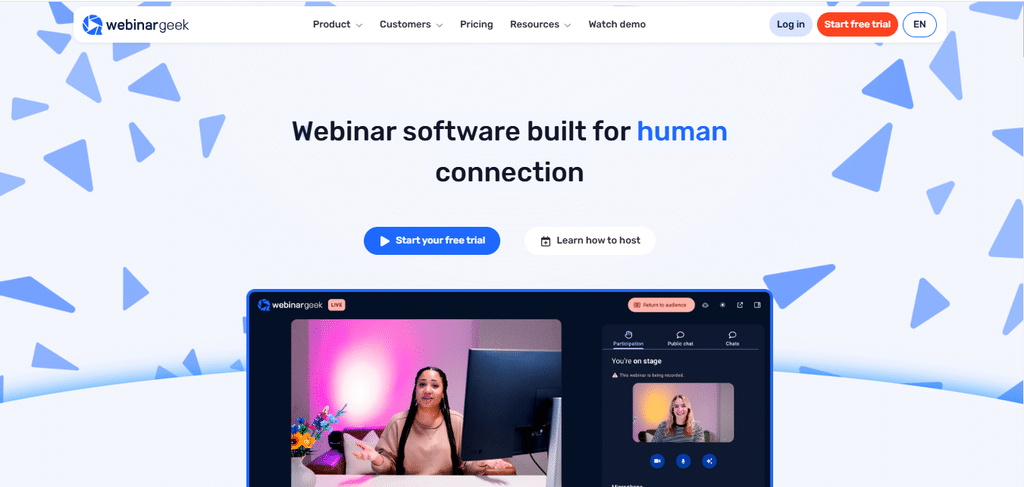
Here are some of its main features:
Webinar Types
You can run live, automated, on-demand, hybrid and paid webinars, with unlimited webinars per month on every plan. Just-in-time webinars let a registrant sign up for a session that starts every 5, 10 or 15 minutes. Hybrid webinars combine a live session with a pre-recorded video or presentation.
Registration and Branding
A real-time page editor lets you build registration, confirmation and countdown pages in your own branding. You can set custom theme colors, a custom email sender, SEO settings and an embeddable registration form for your own website. Custom registration fields and one-click registration links for people already on your mailing list are included.
Integrations
WebinarGeek connects natively with tools such as HubSpot, Salesforce, Mailchimp, ActiveCampaign, Pipedrive, ConvertKit and others. It also supports Zapier, webhooks and a REST API. Integration triggers can, for example, tag a contact in ActiveCampaign when they have watched 50% of a webinar. HubSpot and Salesforce are paid add-ons on the Premium plan.
Host Controls
Up to 100 presenters can be on stage. You can run a test webinar first, add unlimited moderators, use speaker notes, and upload presentations as PDFs or images. An active speaker option can switch between presenters automatically.
Audience Engagement
There is public and private chat, polls, quizzes, calls-to-action, information boxes, assessments and evaluation forms. You can also invite viewers onto the stage with their camera and microphone. For automated and on-demand sessions, simulated chat and simulated polls and quizzes keep the experience interactive even when nobody is live.
Payments and Replays
Paid webinars run through Stripe or Mollie, with discount codes available. Every live webinar can be recorded automatically, shared with one click or downloaded as MP4.
WebinarGeek Pricing
WebinarGeek has two main plans, and prices are in euros. There is no permanent free plan.
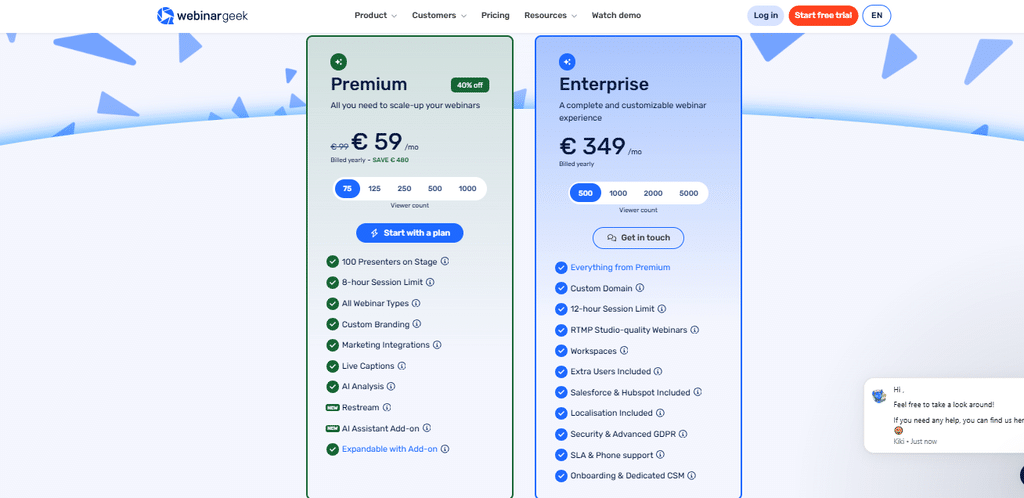
Premium plan: This plan is priced at €59/month when billed yearly, or €99/month when billed monthly. The price depends on the viewer count you pick, from 75 up to 1,000. It includes 100 presenters on stage, sessions of up to 8 hours, all webinar types, custom branding, marketing integrations, live captions, AI analysis and Restream.
Enterprise plan: It starts at €349/month on an annual contract. It covers 500 to 5,000 viewers.
Several things cost extra on Premium: extra users, localisation, the AI assistant, branding profiles, HubSpot, Salesforce, RTMP streaming and online onboarding. Check the add-on list before you settle on a budget, because the final bill can be higher than the headline price.
WebinarGeek Discounts and Coupons
WebinarGeek doesn’t advertise coupon codes. The main saving is annual billing, which the site says can save up to 40%. Non-profit organisations can contact the company for special offers, but they must show fiscal documents proving their tax-free status. Agencies and AV companies that host webinars for others can look at the Partner Program.
WebinarGeek Free Trial
WebinarGeek offers a 14-day free trial with all Premium features and, according to the site, no strings attached. You can host as many webinars as you like during the trial. It is long enough to run a few real webinars and test the integrations. Note that this is a trial, not a free plan, so you’ll need to subscribe to keep hosting.
Innovative Features of WebinarGeek
WebinarGeek keeps adding to its platform. Here are the features that stand out:
1. Breakout Rooms for Real Participation
Its recent product update added breakout rooms. You can split your audience into up to 10 rooms of up to 50 people each. Viewers can be assigned automatically or choose their own room, and a timer keeps each session on track. This helps workshops, training and networking sessions feel less like lectures.
2. AI Analysis, AI Assistant and Live Captions
After each live session, AI analysis gives you summaries, practical tips and an analysis of audience feedback. An AI Assistant add-on can answer live chat questions automatically, which lightens the moderator’s workload. Live captions turn speech into text, and the localisation add-on extends captions and the interface to five languages.
3. Restream to Multiple Platforms
Restream lets you broadcast your webinar to YouTube, LinkedIn, Facebook or any custom RTMP destination at the same time. That reaches more viewers from a single live session.
4. Automated and Just-in-Time Webinars
Automated webinars are broadcast as if they were live. Chat automation can replay the messages from a recorded live session, and scheduled interactions keep polls and CTAs firing at the right moment. This is a strong fit for evergreen lead-generation funnels.
5. Built-in Security and GDPR Tools
Because the company is Dutch, privacy is a strong point. You get consent fields, double opt-in, data lookup, anonymization of registrations, data lifecycle rules and a data processing agreement in your account. Security options include password protection, restricting registration by email domain or IP address, reCAPTCHA, blocklists and two-step login.
WebinarGeek, A short how-to guide
Exact menu names may change as the product updates, so treat this as a rough outline.
- Go to the WebinarGeek website and click “Start free trial” to create your account.
- Create a new webinar and choose its type: live, automated, on-demand or hybrid. Set the date, title and presenters.
- Customize your registration page and emails in the page editor.
- Upload your presentation, then add polls, quizzes or calls-to-action.
- Run the test webinar to check your camera, microphone and slides.
- Share the registration link or embed the form on your website. When it’s time, go live, and use a moderator to manage questions.
- After the session, check the statistics and AI analysis, send the replay email, and sync leads to your CRM.